MyWellSpan Sign Up
Creating a MyWellSpan account is your first step toward managing your health online with ease. Once your account is active, you can access your medical records, review test results, schedule or change appointments, request medication refills, and securely message your WellSpan Health care team—anytime, anywhere.
Whether you’ve received an activation code from your provider or want to register using your personal information, the sign-up process is quick, simple, and secure.
Why Create An Account?
A MyWellSpan account lets you save doctors, locations, and articles on Wellspan.org, and also gives you access to the MyWellSpan Patient Portal to manage your healthcare.
Sign Up with an Activation Code
If your WellSpan Health provider has given you an activation code, registering for MyWellSpan takes only a few minutes. Your code is usually printed on your After Visit Summary or sent to you through email after your appointment. This one-time code securely links your identity with your medical record.
Here’s how to get started:
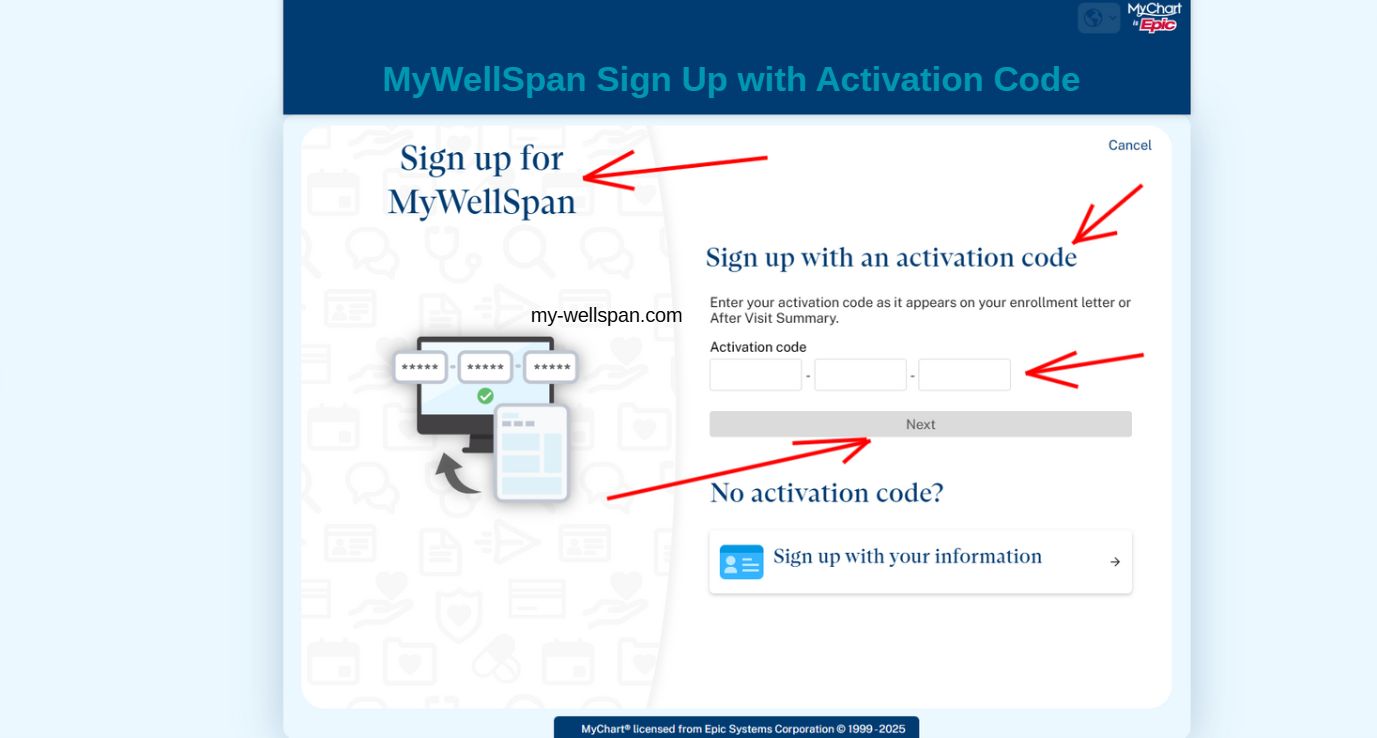
Visit the MyWellSpan Sign-Up Page: Copy and go to https://my.wellspan.org/MyWellSpan/app/activation to fill in your code.
Enter Your Activation Code: Type your MyWellSpan activation code exactly as it appears—it usually includes a mix of letters and numbers separated by dashes.
Verify Your Identity: Provide your date of birth and ZIP code to confirm your record.
Create Login Credentials: Choose a unique username and a secure password you’ll remember.
Confirm Contact Information: Add your email address and set up security questions for extra protection.
Once these steps are complete, your MyWellSpan account will be ready to use. You’ll have instant access to your test results, appointment tools, billing options, and direct communication with your care team.
Sign Up Without an Activation Code
Didn’t receive an activation code? No worries—you can still sign up for MyWellSpan using your personal information.
Here’s how to register:
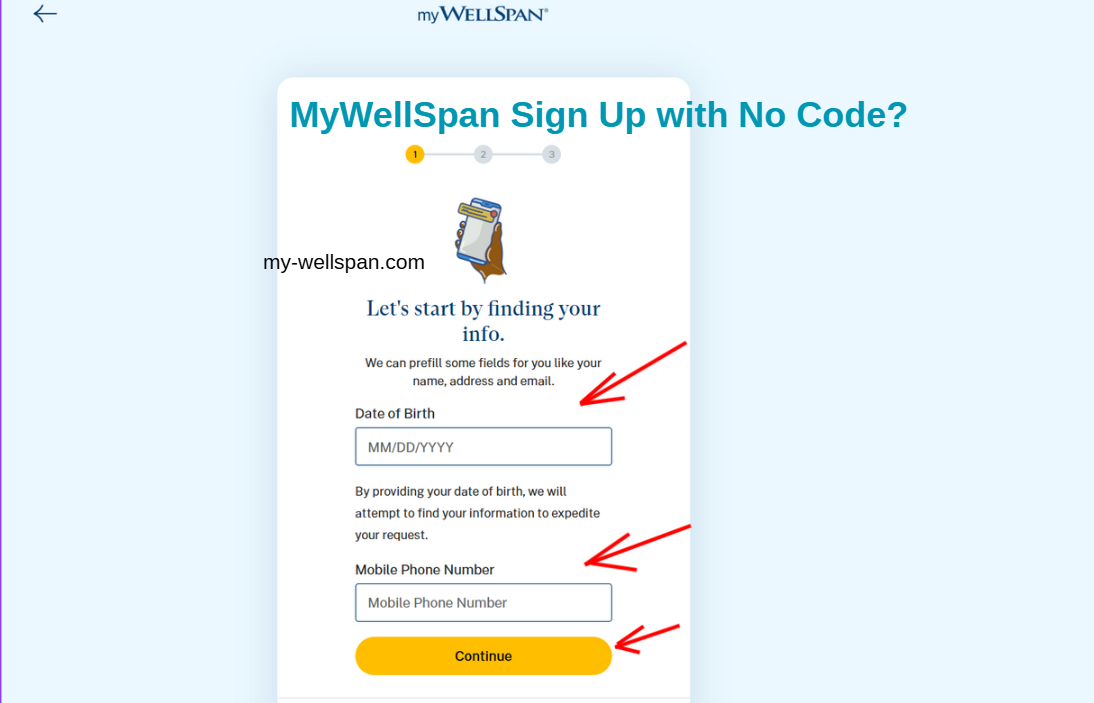
Go to the MyWellSpan Sign-Up with no code? Page at https://my.wellspan.org/MyWellSpan/Signup or copy and visit: https://signup.wellspan.org/
Then click “Sign Up With Your Information” this allows you register without an activation code.
Enter your first and last name, date of birth, and legal gender exactly as they appear in your WellSpan Health records.
Provide your mobile phone number or the last four digits of your Social Security number and ZIP code to help verify your identity.
Confirm your record by answering a few short verification questions.
Create your MyWellSpan username and password, then confirm your email address.
After verification, your account will be ready to use—giving you the same secure access as those who signed up with an activation code.
Mobile Device Instructions
If you prefer using your phone or tablet, you can easily create and access your MyWellSpan account through the mobile app.
Step 1: Download the MyWellSpan app from the Apple App Store or Google Play Store.
Step 2: Once installed, open the app and select WellSpan Health as your healthcare provider.
Step 3: Choose how you’d like to sign up—either using your activation code or without one by verifying your personal information.
Step 4: Complete your registration and log in to start managing your health from your mobile device.
With the app, you’ll enjoy all the features of MyWellSpan—including appointment scheduling, test results, and secure messaging—plus mobile-specific tools like Face ID or fingerprint login for faster access.
Still Need Help?
If you need help signing up or managing your MyWellSpan account, there are several ways to get support.
MyWellSpan Patient Support Line: (866) 638-1842
Available: Monday–Friday, 8:00 a.m.–5:00 p.m.
Official Website: https://www.wellspan.org/
The support team can help with login issues, password resets, account activation, and technical questions.
You can also visit the WellSpan Health Contact Page to find more ways to reach out—whether you have questions about appointments, billing, or financial assistance.
For more information about WellSpan Health, its hospitals, specialty services, and care options, visit their official website to explore how they’re helping patients and families stay well and connected.